Cloud POS · Built for Myanmar မြန်မာဆိုင်များအတွက် Cloud POS

Web + Android POS
for Myanmar Shops
ဆိုင်အရောင်း၊ Stock နဲ့ ကြွေးစာရင်းကို
တစ်နေရာတည်းက စီမံပါ

Manage sales, stock, customer due, expenses, delivery orders, and reports from one connected system. Web နဲ့ Android နှစ်မျိုးလုံးကနေ အရောင်း၊ stock၊ ဖောက်သည်ကြွေး၊ ကုန်ကျစရိတ်၊ delivery order နဲ့ report တွေကို လွယ်လွယ်ကူကူ စီမံနိုင်ပါတယ်။

No credit card required · Free for 1 month Credit card မလိုပါ · ၁ လ အခမဲ့ စမ်းသုံးနိုင်ပါတယ်

Salesအရောင်း StockStock Customer Dueကြွေးစာရင်း Expensesကုန်ကျစရိတ် ReportsReport များ Android AppAndroid App
pos.ayarmm.com/home
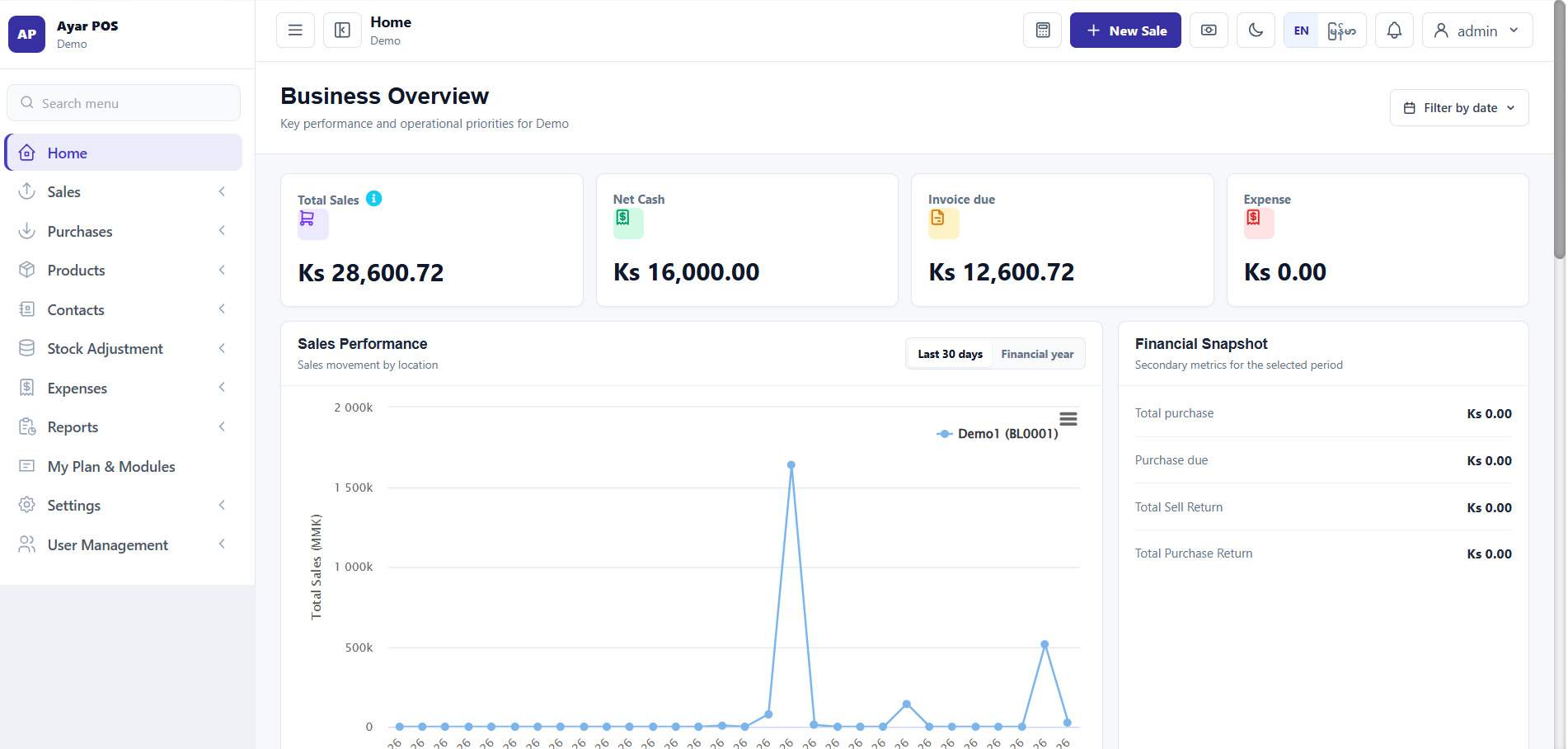
Ayar POS Web Dashboard
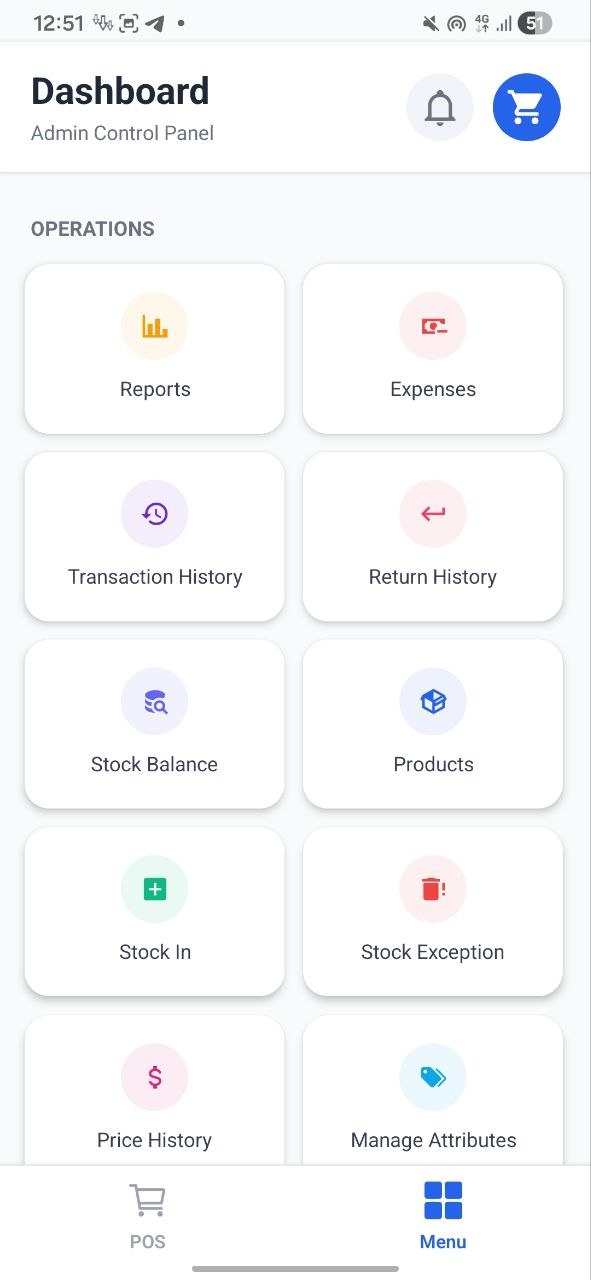
Ayar POS Android
💰
520,000 Ks
Today Salesဒီနေ့အရောင်း
📦
12 items
Low StockStock နည်းနေ
👤
180,000 Ks
Customer Dueဖောက်သည်ကြွေးကျန်
Why Ayar POSAyar POS ဘာကြောင့်ရွေးသင့်သလဲ

Everything your shop needs, in one systemဆိုင်တစ်ဆိုင်လိုအပ်တာတွေကို စနစ်တစ်ခုတည်းမှာ စုစည်းထားပါတယ်

Replace manual notebooks and spreadsheets with a real-time cloud system accessible from any browser or Android device.စာအုပ်နဲ့ Excel သုံးပြီးမှတ်နေရတဲ့အလုပ်တွေကို Browser သို့မဟုတ် Android device ကနေ အချိန်နဲ့တပြေးညီ စီမံနိုင်တဲ့ cloud စနစ်နဲ့ အစားထိုးနိုင်ပါတယ်။

Fast Checkoutငွေကောက်မြန်ဆန်

Record sales, scan barcodes, print receipts, and accept any payment in seconds.Barcode scan လုပ်၊ ဘောက်ချာထုတ်၊ ငွေချေမှုမှတ်တမ်းတင်ခြင်းကို စက္ကန့်ပိုင်းအတွင်း လုပ်နိုင်ပါတယ်။

Stock Controlစတော့စီမံခြင်း

Products deduct automatically on every sale. Get alerts before stock runs out.ရောင်းလိုက်တိုင်း စတော့အလိုအလျောက်လျော့ပြီး ကုန်မသွားခင် သတိပေးချက်ရနိုင်ပါတယ်။

Customer Due Trackingဖောက်သည်အကြွေးစာရင်း

Track credit sales per customer, view outstanding balances, and collect payments.ဖောက်သည်တစ်ဦးချင်းစီရဲ့ အကြွေးကျန်ကိုကြည့်ပြီး တစ်စိတ်တစ်ပိုင်း သို့မဟုတ် အပြည့် ငွေကောက်နိုင်ပါတယ်။

Delivery Workflowပို့ဆောင်ရေးစီမံခြင်း

Create delivery orders, track from packed to delivered, manage pending payments.ပို့ဆောင်ရေးအော်ဒါဖန်တီးပြီး ပြင်ဆင်ပြီးမှ ပို့ပြီးသည့်အထိ အခြေအနေလိုက် စီမံနိုင်ပါတယ်။

Smart ReportsReport များ

Daily, weekly, monthly profit and loss, expenses, stock, and cash session reports.နေ့စဉ်၊ အပတ်စဉ်၊ လစဉ် အရှုံးအမြတ်၊ ကုန်ကျစရိတ်၊ စတော့နှင့် cash session report များကိုကြည့်နိုင်ပါတယ်။

AI Shop AssistantAI ဆိုင်ကူညီသူ

Ask questions about your shop in Myanmar or English. Read-only — cannot edit data.ဆိုင်ဒေတာကို မြန်မာလို သို့မဟုတ် English လို မေးနိုင်ပါတယ်။ ဖတ်ရန်သာဖြစ်ပြီး ဒေတာကို မပြင်နိုင်ပါ။

Built Forသင့်တော်သောဆိုင်များ

Built for Myanmar retail businessesမြန်မာ လက်လီဆိုင်များအတွက် အထူးသင့်တော်ပါတယ်

From a single corner shop to multi-branch retail — Ayar POS adapts to how you run your business.ဆိုင်ငယ်တစ်ဆိုင်ကနေ branch အများရှိတဲ့ဆိုင်အထိ သင့်လုပ်ငန်းပုံစံနဲ့ကိုက်ညီအောင် အသုံးပြုနိုင်ပါတယ်။

Grocery Storeကုန်စုံဆိုင်
Mini MartMini Mart
Pharmacyဆေးဆိုင်
Stationery Shopစာရေးကိရိယာ
Fashion / Clothingအဝတ်အထည်ဆိုင်
Electronics Shopအီလက်ထရောနစ်
Online Sellerအွန်လိုင်းရောင်းချသူ
Beauty / Salonအလှပြင်ဆိုင်
Multi-branch ShopsBranch အများရှိသောဆိုင်
Restaurant / Cafeစားသောက်ဆိုင် Soon
Start Free Trial for Your Shopသင့်ဆိုင်အတွက် အခမဲ့ စမ်းသုံးမည်
Core Modulesအဓိက Modules

What Ayar POS helps you manageAyar POS နဲ့ ဘာတွေစီမံနိုင်မလဲ

Point of Saleရောင်းချမှု POS

  • Sales & checkoutရောင်းချမှုနှင့် ငွေကောက်
  • Barcode scanningBarcode scan
  • Receipt printingဘောက်ချာပုံနှိပ်
  • Payments (Cash, KBZPay, Wave...)ငွေပေးချေမှုများ (Cash, KBZPay, Wave...)
  • Returns & refundsပြန်အမ်း/ပြန်ဝယ် မှတ်တမ်း

Inventory Managementစတော့စီမံခြင်း

  • Product & category managementကုန်ပစ္စည်းနှင့် အမျိုးအစား
  • Purchase stock inအဝယ် stock ဝင်ခြင်း
  • Low stock alertsစတော့နည်း သတိပေးချက်
  • Pack / dozen / unit costingပါကင်/ဒါဇင်/ခုရေ ကုန်ကျတွက်ချက်မှု
  • Stock adjustmentsစတော့ပြင်ဆင်မှု

Customer & Deliveryဖောက်သည်နှင့် ပို့ဆောင်ရေး

  • Credit sales trackingအကြွေးရောင်းမှတ်တမ်း
  • Customer due balanceဖောက်သည်အကြွေးကျန်
  • Due collection (partial/full)အကြွေးကောက်ခံခြင်း
  • Delivery order workflowပို့ဆောင်ရေးအော်ဒါစီမံခြင်း
  • Payment-pending trackingငွေမကောက်ရသေးသောအော်ဒါများ

Reports & ControlReport နှင့် ထိန်းချုပ်မှု

  • Daily / weekly / monthly reportsနေ့စဉ်/အပတ်စဉ်/လစဉ် report
  • Profit & loss statementအရှုံးအမြတ်
  • Expense trackingကုန်ကျစရိတ်မှတ်တမ်း
  • Cash register sessionsCash session
  • Auto Excel report deliveryExcel report အလိုအလျောက်ပို့ခြင်း
pos.ayarmm.com
Ayar POS Web Dashboard
Ayar POS Android
Web + AndroidWeb + Android

One connected system — run from web or AndroidWeb နဲ့ Android နှစ်ခုလုံး ချိတ်ဆက်သုံးနိုင်ပါတယ်

Owners manage the business from any browser. Cashiers sell from Android devices. All data stays in sync automatically through the cloud.ဆိုင်ရှင်က Browser မှာ စီမံနိုင်ပြီး cashier က Android device မှာ ရောင်းချနိုင်ပါတယ်။ အချက်အလက်အားလုံး cloud မှတစ်ဆင့် အလိုအလျောက် sync ဖြစ်နေပါမယ်။

Web DashboardWeb Dashboard
For owner, manager, adminဆိုင်ရှင်၊ manager၊ admin အတွက်
Android AppAndroid App
For cashier, mobile salesCashier နှင့် mobile sales အတွက်
Cloud SyncCloud Sync
Sales on Android show in web instantlyAndroid မှ ရောင်းချမှုကို Web မှာ ချက်ချင်းမြင်နိုင်
Offline AndroidOffline Android
Sell offline, sync when reconnectedInternet မရှိချိန်မှာလည်းရောင်းချပြီး ပြန်ချိတ်မိတဲ့အခါ sync လုပ်နိုင်
Receipt printing from web or Android printerWeb သို့မဟုတ် Android printer မှ ဘောက်ချာပုံနှိပ်နိုင်
Same products, stock and customer data on both devicesကုန်ပစ္စည်း၊ စတော့နှင့် ဖောက်သည်ဒေတာများ Web/Android နှစ်ခုလုံးမှာတူညီ
Multiple Android devices per shop (plan-dependent)Plan အလိုက် ဆိုင်တစ်ဆိုင်မှာ Android device အများသုံးနိုင်
Smart FeaturesSmart Features

Built for how Myanmar shops actually workမြန်မာဆိုင်များ လုပ်ဆောင်ပုံနှင့် ကိုက်ညီသော features

Pack-to-Unit CostingPack-to-Unit ကုန်ကျ

Buy by dozen, sell by piece. Costing automatically adjusts per unit.Dozen ဝယ်၊ ခုခွဲရောင်း — ကုန်ကျ auto အညီပြ

Role & PermissionRole + Permission

Different access levels for owner, manager, and cashier.Owner, manager, cashier အတွက် access level သတ်မှတ်

Multi-location ControlBranch စီမံ

Manage multiple shop locations from one web account (Premium plan).Branch အများကို account တစ်ခုမှ စီမံ (Premium plan)

Receipt Printer SupportReceipt Printer

Connect Bluetooth or USB thermal receipt printers from web or Android.Bluetooth / USB receipt printer — web + Android မှ ချိတ်ဆက်

Auto Report DeliveryAuto Report ပို့ခြင်း

Daily, weekly, and monthly Excel reports sent to email automatically.Daily/weekly/monthly Excel report — email သို့ auto ပို့

Shop Assistant LiteShop Assistant Lite

Daily read-only shop check — sales, stock, due, delivery at a glance.Read-only daily overview — ရောင်းချမှု၊ stock၊ ကြွေး တချက်တည်းမြင်

Cloud BackupCloud Backup

Data stored on cloud servers. Accessible from any device, anytime.Data cloud server တွင် သိမ်းဆည်း — မည်သည့် device မှ ဝင်ရောက်နိုင်

Auto Reports

Reports delivered automatically to your inboxReport များ သင့် inbox သို့ auto ပို့ပေးသည်

Ayar POS automatically sends Daily, Weekly, Monthly, and Yearly Excel reports by Email or Telegram — so you always know your shop performance without logging in.Ayar POS မှ Daily, Weekly, Monthly, Yearly Excel report များကို Email (သို့) Telegram သို့ auto ပို့ပေးသည်၊ login မဝင်ဘဲ ဆိုင်အခြေနေ သိနိုင်သည်

Daily, weekly, monthly, yearly Excel reportsDaily/weekly/monthly/yearly Excel report
Email delivery on Standard & Premium plansStandard & Premium plan တွင် Email ပို့
Telegram delivery on Premium planPremium plan တွင် Telegram ပို့
Report Delivery Center with delivery historyReport Delivery Center — delivery history
Test sends do not block scheduled deliveryTest send လုပ်သော်လည်း scheduled delivery မပျက်
Auto Report — ExampleAuto Report — နမူနာ
Daily Reportဒီနေ့ report
via EmailEmail မှ
Daily
Weekly SummaryWeekly summary
via EmailEmail မှ
Weekly
Monthly P&Lလစဉ် P&L
via Email + TelegramEmail + Telegram မှ
Monthly
Yearly Overviewနှစ်ပတ်လည် overview
via Email + TelegramEmail + Telegram မှ
Yearly

Telegram reports require Premium plan. Email available on Standard & Premium.Telegram report — Premium plan လို၊ Email report — Standard & Premium

Pricingဈေးနှုန်း

Simple pricing for every shop sizeဆိုင်အရွယ်အစားအလိုက် ရိုးရှင်းသောဈေးနှုန်း

Start with the free demo. No credit card required. Upgrade when you're ready.Demo ဖြင့် အခမဲ့ စတင်ပါ။ Credit card မလို။ အဆင်သင့်ဖြစ်မှ upgrade ပြုလုပ်ပါ

DemoDemo
Freeအခမဲ့
1 လ အခမဲ့1 လ အခမဲ့
1 location · 2 users · 2 devices
Core POSပင်မ POS
Stock trackingStock tracking
Expensesကုန်ကျ
Daily reportsDaily reports
Start Freeအခမဲ့ စတင်
BasicBasic
Ks 30,000
Ks / monthKs / လ
1 location · 2 users · 2 devices
All core POS featuresပင်မ POS features
Stock & purchaseStock & purchase
ReportsReports
Android appAndroid app
Get BasicBasic ယူပါ
RECOMMENDEDအကြံပြုသည်
StandardStandard
Ks 50,000
Ks / monthKs / လ
2 locations · 5 users · 5 devices
All Basic featuresBasic features အားလုံး
Shop Assistant LiteShop Assistant Lite
Email Auto ReportsEmail Auto Reports
5 users & 5 devices5 users & 5 devices
Get StandardStandard ယူပါ
PremiumPremium
Ks 800,000
Ks / yearKs / နှစ်
3 locations · unlimited users · 10 devices
All Standard featuresStandard features အားလုံး
Telegram Auto ReportsTelegram Auto Reports
Priority supportPriority support
Unlimited usersUnlimited users
Get PremiumPremium ယူပါ

Demo plan: free for 1 month, no credit card required.   Demo plan — credit card မလိုဘဲ 1 လ အခမဲ့   See full pricing & comparison →ဈေးနှုန်း အပြည့်အစုံ ကြည့် →

FAQမေးလေ့ရှိသောမေးခွန်းများ

Frequently Asked Questionsမေးလေ့ရှိသောမေးခွန်းများ

What is Ayar POS? Ayar POS ဆိုတာ ဘာလဲ?
Ayar POS is a web and Android-based point-of-sale system for Myanmar shops. It handles sales, stock, customer due, expenses, delivery orders, and daily reports from one connected system. Ayar POS က မြန်မာဆိုင်တွေအတွက် Web နဲ့ Android နှစ်ခုလုံးသုံးလို့ရတဲ့ POS စနစ်ပါ။ အရောင်း၊ Stock၊ ဖောက်သည်ကြွေး၊ ကုန်ကျစရိတ်၊ Delivery order နဲ့ Report တွေကို တစ်နေရာတည်းကနေ ကြည့်ပြီး စီမံလို့ရပါတယ်။
Can I use Ayar POS on Android? Android ဖုန်းနဲ့ သုံးလို့ရပါသလား?
Yes. The Ayar POS Android app lets you make sales, scan barcodes, collect customer due, and sync data in real time with the web dashboard. သုံးလို့ရပါတယ်။ Android app ကနေ ရောင်းတာ၊ barcode scan လုပ်တာ၊ customer ကြွေးကောက်တာတွေ လုပ်နိုင်ပြီး Web dashboard နဲ့လည်း data sync ဖြစ်ပါတယ်။
Can the Android app work offline? Internet မရှိရင် Android app သုံးလို့ရပါသလား?
Yes. The Android app supports offline sales mode — you can record sales without an internet connection. Data syncs automatically with the web dashboard when your device is back online. ရပါတယ်။ Internet မရှိတဲ့အချိန်မှာလည်း Android app နဲ့ ရောင်းထားလို့ရပါတယ်။ Internet ပြန်ရလာတဲ့အခါ Web dashboard ထဲကို data ပြန် sync လုပ်လို့ရပါတယ်။
Does Ayar POS support customer credit? Customer ကြွေးစာရင်း ကိုင်လို့ရပါသလား?
Yes. You can record credit sales, view outstanding balances per customer, and collect partial or full payments at any time. ရပါတယ်။ အကြွေးရောင်းတာ မှတ်ထားလို့ရပြီး customer တစ်ယောက်ချင်းစီရဲ့ ကြွေးကျန်ကို ကြည့်လို့ရပါတယ်။ ငွေတစ်စိတ်တစ်ပိုင်းပေးတာ၊ အပြည့်ပေးတာတွေလည်း မှတ်လို့ရပါတယ်။
Does it support pack, dozen, and unit costing? Pack / dozen / unit costing သုံးလို့ရပါသလား?
Yes. Ayar POS supports pack-to-unit costing — you can purchase stock in dozens or cartons and sell by individual units. The system automatically calculates cost per unit. ရပါတယ်။ Dozen / carton နဲ့ဝယ်ပြီး တစ်ခုချင်း ပြန်ရောင်းတဲ့ဆိုင်တွေအတွက် သင့်တော်ပါတယ်။ တစ်ခုချင်း cost ကို system က တွက်ပေးနိုင်ပါတယ်။
What is Shop Assistant Lite? Shop Assistant Lite ဆိုတာ ဘာလဲ?
Shop Assistant Lite is a daily read-only shop overview. It shows your sales, stock alerts, customer due, delivery status, and cash session without editing any data. Shop Assistant Lite က ဒီနေ့ဆိုင်အခြေအနေကို အမြန်ကြည့်ဖို့ပါ။ အရောင်း၊ stock alert၊ customer ကြွေး၊ delivery အခြေအနေတွေကို data မပြင်ဘဲ ကြည့်လို့ရပါတယ်။
Does Ayar POS send reports automatically? Ayar POS မှ report တွေ auto ပို့ပေးသလား?
Yes. The Auto Report feature sends Daily, Weekly, Monthly, and Yearly Excel reports by Email (Standard & Premium) or Telegram (Premium). Reports are scheduled and sent automatically without any manual action. ပို့ပေးလို့ရပါတယ်။ Daily, Weekly, Monthly, Yearly Excel report တွေကို Email နဲ့ပို့လို့ရပြီး သတ်မှတ် Plan တွေမှာ Telegram နဲ့လည်း ရနိုင်ပါတယ်။
Can I use barcode scanner and receipt printer? Barcode scanner နဲ့ receipt printer သုံးလို့ရပါသလား?
Yes. Ayar POS supports barcode-based sales and receipt printing depending on your device and printer setup. ရပါတယ်။ သုံးမယ့် device နဲ့ printer setup ပေါ်မူတည်ပြီး barcode နဲ့ရောင်းတာ၊ ဘောင်ချာ print ထုတ်တာတွေ သုံးလို့ရပါတယ်။
How can I make a payment? Payment ကို ဘယ်လိုပေးရမလဲ?
You can pay by bank transfer, mobile payment, or other supported payment methods. After payment, send the payment screenshot or transaction details to support for confirmation. Bank transfer၊ mobile payment ဒါမှမဟုတ် support လုပ်ထားတဲ့ payment method တွေနဲ့ ပေးချေလို့ရပါတယ်။ ငွေလွှဲပြီးရင် confirmation လုပ်ဖို့ payment screenshot သို့မဟုတ် transaction details ကို support ထံ ပေးပို့ပေးပါ။
Can I assign user roles and permissions? User role/permission ခွဲပေးလို့ရပါသလား?
Yes. You can assign different roles and permissions to staff members, such as owner, manager, cashier, or staff, depending on what each person needs to access. ရပါတယ်။ Staff တစ်ယောက်ချင်းစီအတွက် owner၊ manager၊ cashier၊ staff စတဲ့ role တွေခွဲပြီး ဘာတွေသုံးခွင့်ရှိမလဲဆိုတာ permission နဲ့ သတ်မှတ်ပေးလို့ရပါတယ်။
Can staff see sensitive data? Staff တွေက sensitive data တွေ မြင်နိုင်မလား?
Staff can only see the data allowed by their assigned role and permissions. Sensitive information such as profit, reports, settings, or customer dues can be restricted from certain staff members. Staff တွေက သူတို့ကိုပေးထားတဲ့ role နဲ့ permission အရ ခွင့်ပြုထားတဲ့ data တွေကိုပဲ မြင်နိုင်ပါတယ်။ Profit၊ reports၊ settings၊ customer due လို sensitive information တွေကို staff အချို့မမြင်ရအောင် ကန့်သတ်ထားလို့ရပါတယ်။
Do you help with setup and training? Setup နဲ့ သုံးနည်း ကူညီပေးပါသလား?
Yes. We can help with initial setup and guide your team on how to use the POS workflow. ကူညီပေးပါတယ်။ စစချင်း setup လုပ်တာနဲ့ သင့် team ကို POS သုံးနည်း ပြောပြပေးတာတွေ ကူညီပေးနိုင်ပါတယ်။
Can I start with the Demo Plan? Demo Plan နဲ့ စလိုရပါသလား?
Yes. You can use the Demo Plan free for 1 month. No credit card is required. You can test Web POS, Products, Sales, and basic Reports. ရပါတယ်။ Demo ကို ၁ လ အခမဲ့ စမ်းသုံးလို့ရပါတယ်။ Credit card မလိုပါဘူး။ Web POS၊ Products၊ Sales နဲ့ အခြေခံ Report တွေကို အရင်စမ်းကြည့်လို့ရပါတယ်။
Can I upgrade later? နောက်မှ Upgrade လုပ်လိုရပါသလား?
Yes. You can upgrade to a higher plan at any time. To upgrade, please contact +959969379186. ရပါတယ်။ နောက်မှ ဆိုင်အတွက် ပိုလိုလာရင် Plan မြှင့်လို့ရပါတယ်။ Upgrade လုပ်ချင်ရင် +959969379186 ကို ဆက်သွယ်ပေးပါ။
Can I get my data back after my subscription ends? Subscription သက်တမ်းကုန်သွားရင် data ပြန်ယူလို့ရပါသလား?
Yes. After your subscription ends, you can request your business data, and we will provide it back to you as an Excel file. ရပါတယ်။ Subscription သက်တမ်းကုန်သွားပြီးနောက် သင့်လုပ်ငန်း data ကို တောင်းဆိုနိုင်ပါတယ်။ ကျွန်တော်တို့ဘက်က Excel file အနေနဲ့ ပြန်ထုတ်ပေးနိုင်ပါတယ်။
Which plan should I choose? ဘယ် plan ရွေးသင့်လဲ?
Start with Demo (free, 1 month). For a growing shop, Standard is recommended — it includes Shop Assistant Lite and email Auto Reports. Premium adds multi-location, priority support, and Telegram reports. အရင်စမ်းချင်ရင် Demo နဲ့စလို့ရပါတယ်။ ဆိုင်အသုံးပြုမှု များလာရင် Standard ကို အကြံပြုပါတယ်။ Branch များတာ၊ support ပိုလိုတာမျိုးဆို Premium ကိုရွေးနိုင်ပါတယ်။

Start managing your shop with Ayar POS Ayar POS ဖြင့် ဆိုင်စီမံမှုကို စတင်ပါ

Free for 1 month · No credit card required · Web + Android · Setup in 15 minutes 1 လ အခမဲ့ · Credit card မလို · Web + Android · ၁၅ မိနစ် setup

Start Free Trialအခမဲ့ Demo စတင်မည် Contact SupportSupport ဆက်သွယ်မည်