Built for Myanmar · Myanmar အတွက် တည်ဆောက်

Web + Android
POS System

Myanmar ဆိုင်များအတွက်
ရောင်း · stock · report တစ်နေရာတည်းမှ

Manage daily checkout, stock, customer credit, expenses, cash register, and reports — all from one connected web dashboard.

ရောင်းချမှု မှတ်တမ်း၊ stock စာရင်း၊ customer ကြွေး၊ ကုန်ကျ နှင့် daily report တို့ကို web dashboard တစ်ခုတည်းမှ စီမံပါ

အခမဲ့ စမ်းသုံးမည် · Free Trial ဈေးနှုန်းကြည့်မည် · Pricing
ပင်မ POS features အားလုံး ပါဝင် Android app ပါ Credit card မလို
pos.ayarmm.com/home
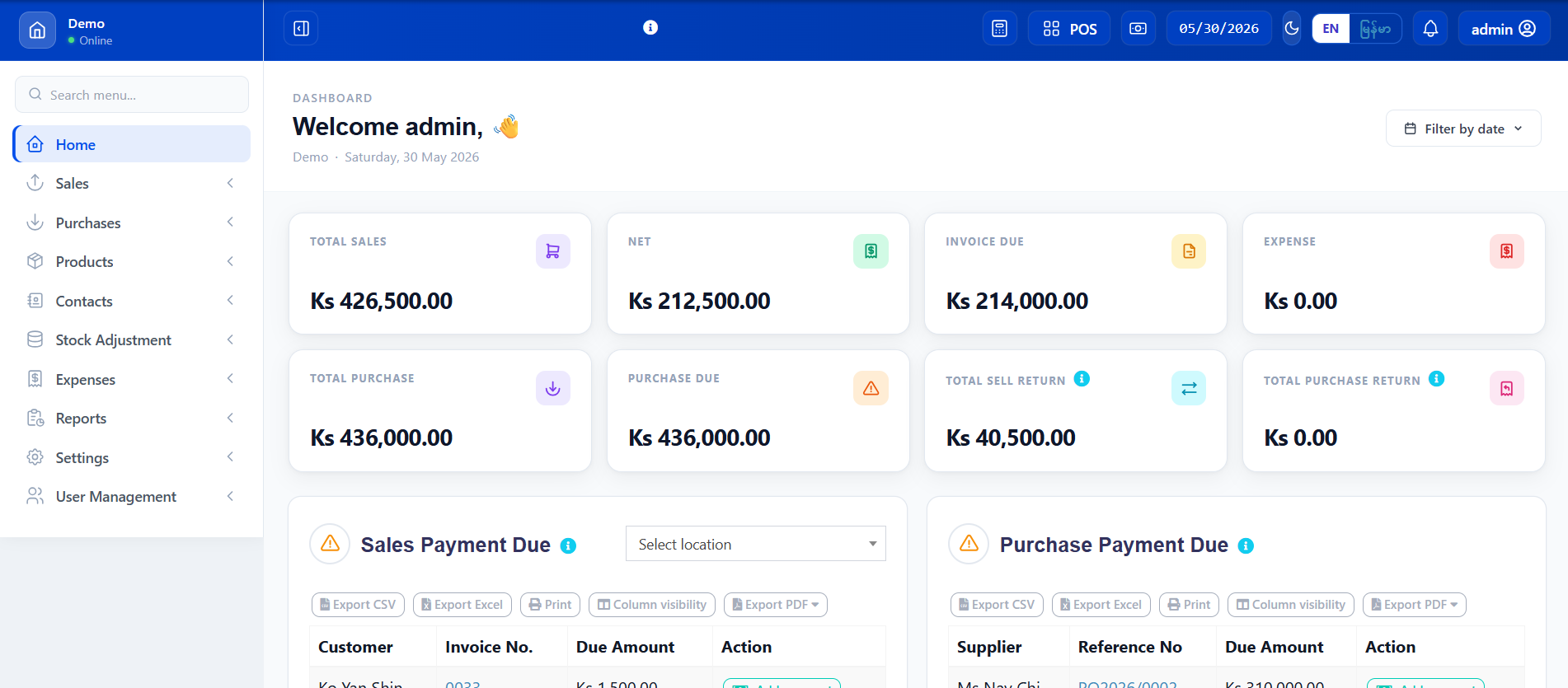
Ayar POS Dashboard — ဆိုင်ပင်မ dashboard
ANDROID APP
Synced · Sync ပြီးပါပြီ
ရောင်းချမှု·Sales & Checkout Stock·Stock Control Customer ကြွေး·Customer Due ကုန်ကျစရိတ်·Expenses Cash Register·Cash Register Android App·Android App
Ayar POS ဆိုတာ ဘာလဲ? · What is Ayar POS?

ဆိုင်တစ်ဆိုင်လုံးကို
တစ်နေရာတည်းမှ ကိုင်တွယ်ပါ

Your complete shop management system

Ayar POS is a web-based point-of-sale system built for Myanmar retail shops, pharmacies, mini marts, and growing businesses. It replaces manual ledgers and disconnected spreadsheets with one real-time dashboard you can access from any browser.

Ayar POS သည် Myanmar ဆိုင်များ၊ ဆေးဆိုင်များ၊ mini mart များ နှင့် စီးပွားရေး လုပ်ငန်းများအတွက် web-based point-of-sale system ဖြစ်ပါသည်။ လက်ဖြင့်ရေးသော ledger နှင့် spreadsheet ကို ဖယ်ထုတ်ပြီး browser မှတစ်ဆင့် real-time dashboard တစ်ခုတည်းဖြင့် ကိုင်တွယ်နိုင်ပါသည်။

ဘာတွေ ပါဝင်လဲ? · What's included
ရောင်းချမှု မှတ်တမ်း + receipt printing · Sales recording + receipt printing
Product stock ကို auto tracking · Automatic stock tracking
Customer ကြွေးကျန် + collection · Customer due tracking + collection
ကုန်ကျစရိတ် + cash register · Expense recording + cash register
Daily / monthly reports · Daily and monthly reports
Android app နှင့် sync · Sync with Android app
အခမဲ့စမ်းသုံး · Free Trial ဈေးနှုန်းကြည့် · Pricing
Ayar POS dashboard on laptop

Ayar POS Dashboard — ဆိုင်ပင်မ screen

Dashboard Screenshot · Dashboard ပုံစစ်

ဝင်ရောက်ပြီးချင်း မြင်ရသော screen

The real dashboard you see the moment you log in

pos.ayarmm.com/home
Ayar POS real dashboard screenshot
ဒီနေ့ အရောင်းစုစုပေါင်း
Total Sales Today

Dashboard အပေါ်ဆုံးမှာ ရောင်းငွေ ချက်ချင်းမြင်နိုင်ပါသည်

See today's sales total instantly at the top

Net Profit · အမြတ်
Net Profit

Gross profit မှ expense နှုတ်ပြီး net profit ကို တွက်ချက်ပြပါသည်

Gross profit minus expenses shown automatically

Customer ကြွေး
Customer Due

Due နှင့် partial ငွေပေးချေမှုများ ချက်ချင်းမြင်ရပါသည်

Outstanding dues and partial payments at a glance

ဝယ်ယူမှု Due
Purchase Due

Supplier ထံ ပေးရမည့် ငွေများ မြင်နိုင်ပါသည်

Amounts owed to suppliers displayed clearly

ဘယ်သူ သုံးလဲ? · Who Uses It

Myanmar ဆိုင်အမျိုးအစားအားလုံးအတွက်

Built for every type of Myanmar shop operation

ဆိုင်ခန်း
Retail Shop
ကုန်ပစ္စည်းရောင်းဆိုင်
General retail
ဆေးဆိုင်
Pharmacy
ဆေးဝါး + controlled stock
Medicine & health
Mini Mart
Mini Mart
နေ့စဉ် ကုန်ပစ္စည်း
Fast-moving goods
Online ရောင်းသူ
Online Seller
Delivery + credit sales
Delivery tracking
Grocery ဆိုင်
Grocery
မြင့်မားသော ပမာဏ ကုန်ပစ္စည်း
High-volume items
Features · အင်္ဂါရပ်များ

ဆိုင်တော်တော်များများ လိုအပ်တာ အားလုံးပါ

Everything your shop needs — no complex setup required

ရောင်းချမှု · Sales & Checkout

Sales & POS Checkout

Customer လာဝယ်တဲ့အခါ ပစ္စည်း ရှာ (သို့) barcode scan လုပ်ပြီး ငွေပေးချေ method ရွေး၊ receipt ပုံနှိပ်ပါ

Search or scan barcode, choose payment method, print receipt for walk-in customers

Product & Stock

Product & Stock Control

Product များကို variation (size, color) ဖြင့် ထည့်၊ ဝယ်စျေး + ရောင်းစျေး သတ်မှတ်၊ stock tracking နှင့် alert quantity ထည့်ပါ

Add products with variations, set purchase & selling prices, enable stock tracking and restock alerts

Customer ကြွေး · Customer Due

Customer Credit & Due

Credit sale မှတ်တမ်းထိုး၊ customer တစ်ဦးချင်း ကြွေးကျန်ကို ကြည့်၊ partial (သို့) full payment ကောက်ယူ

Record credit sales, track due per customer, collect partial or full payments with timestamps

ကုန်ကျ + Cash Register

Expenses & Cash Register

ကုန်ကျစရိတ် category အလိုက် မှတ်တမ်းထိုး၊ cash session ဖွင့်/ပိတ်၊ opening နှင့် closing balance စစ်ဆေးပါ

Record expenses by category, open/close cash sessions, track opening and closing balances

Reports · Report များ

Reports & Analytics

ရောင်းချမှု report ကို date range၊ product၊ location၊ payment method အလိုက် ကြည့်ပါ။ Profit & loss၊ stock၊ expense reports

Sales reports by date, product, location, payment method. Profit & loss, stock, expense summaries

Sale Return · ပြန်အမ်း

Sale Return & Refund

မည်သည့် invoice မဆို ပစ္စည်း ပြန်အမ်းနိုင်ပါသည်။ Stock auto-restock ဖြစ်ပြီး customer due ကိုလည်း ချိန်ညှိပါသည်

Process item returns on any invoice. Stock auto-restocked, customer due adjusted automatically

Receipt Printer

Receipt Printer Support

58mm နှင့် 80mm thermal printer များကို USB၊ Network (IP) နှင့် Bluetooth ဖြင့် ချိတ်ဆက်နိုင်ပါသည်

Connect 58mm and 80mm thermal printers via USB, Network (IP), or Bluetooth

Shop Assistant · AI Guide

Shop Assistant Lite & AI

ရောင်းအား၊ stock၊ customer ကြွေး မေးနိုင်ပါသည်။ Software သုံးနည်း guide ကိုလည်း Myanmar + English ဖြင့် မေးနိုင်ပါသည်

Ask about sales, stock, customer due. Get software guides in Myanmar and English

Android App · Android ဖုန်းမှတဆင့်

ဖုန်းကိုင်ပြီး ရောင်းချနိုင်

Sell, scan, and sync from your Android device

The Ayar POS Android app connects to your web account and lets you run sales from any Android phone or tablet. Sales sync instantly — what you sell on mobile appears on the web dashboard in real time.

Ayar POS Android app သည် web account နှင့် ချိတ်ဆက်ပြီး Android ဖုန်း (သို့) tablet မှ ရောင်းချမှုများ ပြုလုပ်နိုင်ပါသည်။ ရောင်းချလိုက်သည်နှင့် web dashboard ပေါ်တွင် ချက်ချင်း မြင်ရပါသည်။

ရောင်းချမှု POS · Fast mobile checkout
Mobile ဖြင့် လျင်မြန်သော ရောင်းချမှု
Barcode scan · Camera barcode scanning
ဖုန်း camera ဖြင့် barcode scan
Customer ကြွေး ကောက် · Due collection on mobile
Mobile မှ customer ကြွေး ကောက်ယူ
Real-time sync · Sync with web dashboard
Web dashboard နှင့် ချက်ချင်း sync
Android App အကြောင်း ပိုမိုသိမည်
Ayar POS Android app screenshot
ဒီနေ့ ရောင်းချမှု
840,000 Ks
Sync ပြီး
Synced to web
How It Works · ဘယ်လို သုံးမလဲ

Setup မှ daily close အထိ

From first setup to closing the register each day

1

ဆိုင် Setup လုပ်ပါ

Set up your shop

Product များ ထည့်ပါ၊ ဈေးနှုန်း သတ်မှတ်ပါ၊ user များ ထည့်ပါ၊ printer ချိတ်ပါ

Add products, set prices, add users, connect printer. Takes 15–30 minutes.

2

ရောင်းချ စပါ

Start selling

POS screen ဖွင့်ပြီး product ရှာ (သို့) scan လုပ်ပါ၊ customer ရွေးပါ၊ ငွေပေးချေမှု complete လုပ်ပါ

Open the POS screen, search or scan items, select customer, complete payment.

3

ဒီနေ့ စစ်ဆေးပါ

Review your day

Dashboard (သို့) Shop Assistant မှတဆင့် ဒီနေ့ ရောင်းချမှု၊ profit၊ customer ကြွေး ကြည့်ပါ

Check today's sales, profit, customer due, and stock alerts from dashboard or assistant.

4

Cash Register ပိတ်ပါ

Close the register

Cash session ပိတ်ပြီး register report စစ်ဆေးကာ daily summary ရိုက်ထုတ်ပါ (သို့) export လုပ်ပါ

Close cash session, review register report, print or export daily summary.

Plans · Package များ

Package အားလုံးတွင် Ayar POS ပါဝင်သည်

Core POS features included in every plan from Demo to Premium

Demo
Demo
အခမဲ့ · 1 လ
Free · 1 month
1 location · 2 users · 2 devices
ပင်မ POS
Stock
Expense
Reports
စမ်းသုံးမည် · Try Free
Basic
Basic
25,000 Ks / လ
25,000 Ks/mo
1 location · 2 users · 2 devices
ပင်မ POS
Stock
Expense
Reports
Purchase
စမ်းသုံးမည် · Try Free
အကြံပြုသည် · RECOMMENDED
Standard
Standard
45,000 Ks / လ
45,000 Ks/mo
1 location · 5 users · 5 devices
ပင်မ POS အားလုံး
Shop Assistant Lite
Advanced reports
Priority
ယခုစတင်မည် · Start Now
Premium
Premium
800,000 Ks / နှစ်
800,000 Ks/yr
3 locations · unlimited users · 10 devices
Standard အားလုံး
Multi-location
AI Explanation
Top priority
စမ်းသုံးမည် · Try Free

* Demo plan ကို credit card မလိုဘဲ 1 လ အခမဲ့ သုံးနိုင်သည် · Demo plan is free for 1 month, no credit card required.

Related Products · ဆက်စပ် Products

Ayar POS နှင့် အတူ သုံးနိုင်သည်

Works together with these Ayar products

ဒီနေ့ပဲ Ayar POS စတင်ပါ

Start Ayar POS today

Demo plan ကို 1 လ အခမဲ့ — credit card မလိုပါ — setup ၁၅ မိနစ်သာ

Free for 1 month · No credit card · Setup in 15 minutes

အခမဲ့ Demo စတင်မည် ဈေးနှုန်းကြည့်မည် · View Pricing

ဖုန်းပိုမိုသိချင်ပါက · Questions? support@ayarmm.com သို့ ဆက်သွယ်ပါ